DataSource
The DataSource folder in the Solution Explorer is a central location where developers can define how their project connects to data sources. This includes structured queries, API endpoints, database connections, and other external data systems.
Each item created in the DataSource folder becomes reusable across forms, flows, reports, and dashboards.
Common Contents:
-
REST API Connections
Define external REST services to fetch or send data. -
Database Queries
Write and store SQL-like queries to retrieve records from external databases. -
Static Data Models
Load static or mock data for testing and prototyping. -
Business Data Endpoints
Centralize access to business-critical external systems.
Context Menu Options:
New Item: Add a new data connection or query file.New Folder: Organize data definitions into custom categories.
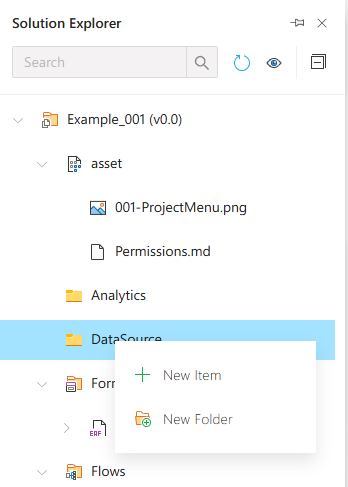
Datasource
The DataSource folder is used to define and manage data connections, queries, and external data integrations in a Synergy IDE project.